Customer Match → Data Manager API: What's Changing

Foreword
If you use the Google Ads API to push Customer Match lists, you've probably received this email:
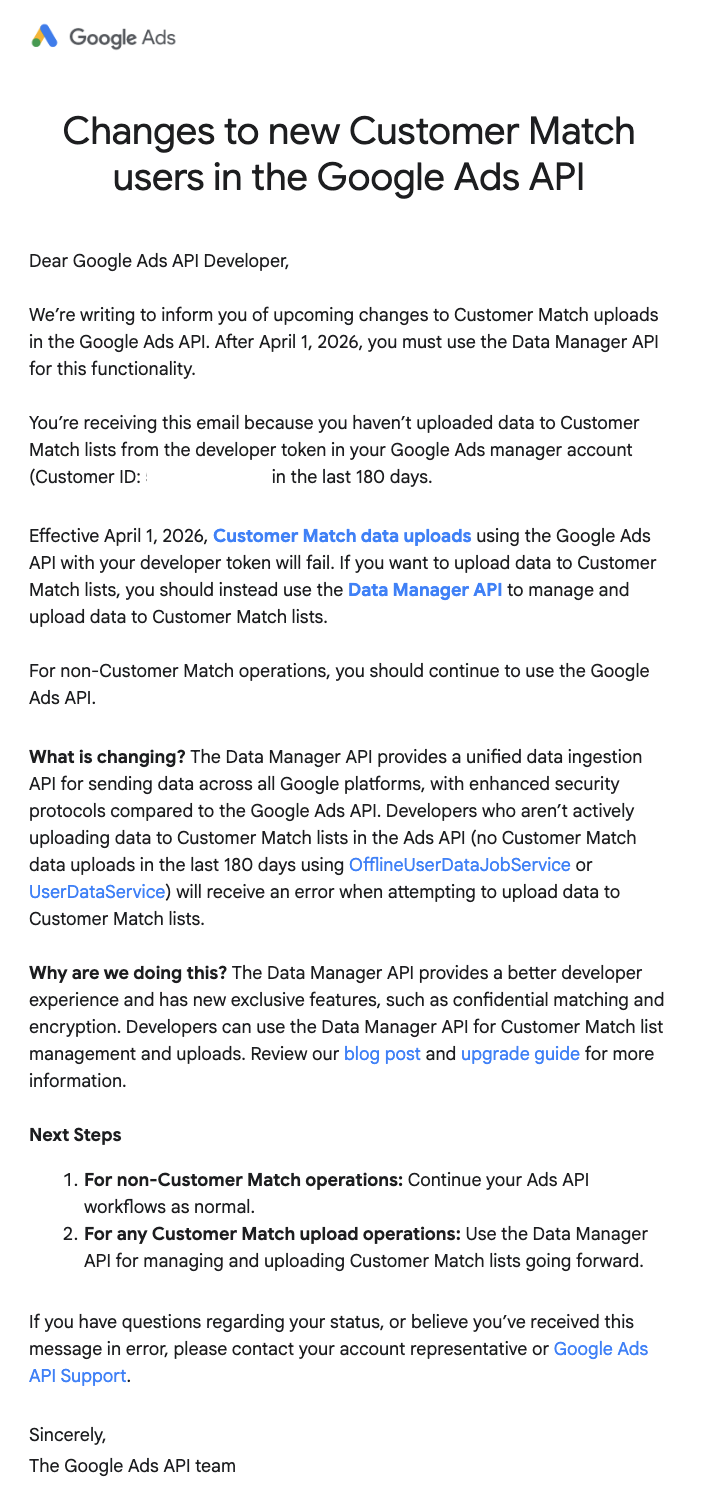
Notification sent to Google Ads API users for Customer Match
The message is clear: starting April 1, 2026, Customer Match uploads via the Google Ads API are cut off for any developer token that has been inactive on this feature for the past 180 days. Active tokens get a temporary reprieve.
Here's our breakdown: what's actually changing, who's impacted, and why a well-designed data architecture shields you from this type of forced migration.
Understanding Customer Match
Overview and stakes
Customer Match lets you import your customer data (emails, phone numbers, addresses) into Google Ads to build audiences. These audiences serve two purposes:
- Target or exclude specific segments in your campaigns
- Feed the bidding algorithm to distinguish existing customers from prospects
The second point is often underestimated. Google Ads offers a "New Customer Acquisition" objective that adjusts bids to prioritize users who are not in your Customer Match lists. Without these lists, the algorithm can't effectively tell new customers from returning ones. Your acquisition strategy runs blind.
We covered this mechanism in detail in our note on enhanced tracking and 1st party data strategy.
Several methods for importing your customer data
Before getting into what's impacted, a useful reminder: there are several ways to push your customer lists into Google Ads.
Manual upload via the Google Ads interface
You import a CSV file directly into Audience Manager. Simple, not automated. Not impacted by the migration.
Native BigQuery → Google Ads connection
You link a BigQuery project in the Google Ads interface (Tools → Data Manager), select a dataset and table, map the fields, and synchronization runs automatically. Not impacted by the migration.
Via the Google Ads API (custom scripts)
Custom scripts (Python, Node, etc.) use a developer token to call OfflineUserDataJobService and push lists into Google Ads. Impacted by the migration.
Via a third-party tool (Hightouch, Zapier, CRM...)
Reverse ETL platforms (Hightouch, Census), automation connectors (Zapier, Make), or CRM integrations (HubSpot, Salesforce) sync your audiences. Under the hood, these tools often use the Google Ads API. Potentially impacted: check that your vendor has migrated to the Data Manager API.
The 2026 migration
What's changing
Google is migrating Customer Match from the Google Ads API to a new dedicated API: the Data Manager API.
The timeline
The mechanism is based on developer token activity over the 180-day rolling window prior to April 1, 2026:
CUSTOMER_NOT_ALLOWLISTED error- Inactive token (no Customer Match upload via the API in the past 180 days): cut off since April 1, 2026. Any attempt returns the error
CUSTOMER_NOT_ALLOWLISTED_FOR_THIS_FEATURE. - Active token (at least one upload in the past 180 days): continues to work for now. Google has not communicated a final sunset date.
- New tokens: no new developer tokens are accepted for Customer Match via the legacy API.
The rest of the Google Ads API (campaigns, reporting, bidding) is not impacted. Only the "Customer Match audience upload" component is affected.
Data Manager API: what it brings
The Data Manager API isn't just a rename. Google has simplified the workflow and added features:
| Data Manager API | Legacy Google Ads API | |
|---|---|---|
| Workflow | Direct ingestion, no job management | Create a job → fill it → launch it → monitor |
| Multi-audiences | 1 request can feed multiple audiences | 1 separate job per audience |
| Confidential matching | Supported | Not available |
| Encryption | Natively supported | Not available |
| Developer token | Not required | Mandatory |
For technical teams that managed Customer Match upload scripts, the code will change. But the end result is the same: your lists land in Google Ads.
Impact and recommendations
Native BigQuery → Google Ads linking
Google Ads lets you connect a BigQuery project directly in the interface (Tools → Data Manager). You select a dataset, a table, map the fields (hashed email, phone, etc.), and synchronization runs automatically. No developer token, no script, no job to monitor.
This native connector does not use the Google Ads API to push audiences. It's been integrated into the Data Manager layer from the start. If your Customer Match audiences are fed through this connection, you are not impacted by the migration.
This is the approach we deploy for our clients through our Capture stack: customer data centralized in BigQuery, audiences synced via the native connector.
Third-party tools and CRMs: the ones actually affected
Even if you don't have custom scripts, you're not necessarily in the clear. Many advertisers sync their Customer Match audiences through third-party tools that use the Google Ads API under the hood.
Potentially impacted:
- Reverse ETL platforms (Hightouch, Census, RudderStack): they push audiences from your data warehouse to Google Ads via the API. Hightouch announced in late 2025 that they migrated to the Data Manager API [5]. Check with your vendor that the migration is complete.
- Automation connectors (Zapier, Make, n8n): if you have a Zap sending contacts to a Customer Match list, the underlying connector needs to be up to date. Zapier is listed as an official Data Manager API partner by Google [6].
- Native CRM integrations (HubSpot, Salesforce): HubSpot offers a direct connection in Data Manager for Customer Match. For Salesforce, there is no native Customer Match connector in Data Manager: you need to go through a third-party partner or reverse ETL [7].
- CMS and ESP modules (Klaviyo, Brevo, ActiveCampaign): some offer Google Ads audience syncs. Check their documentation to confirm they've switched to the Data Manager API.
Key takeaway: even if you've never written a line of code, the tool managing your audiences probably uses the Google Ads API. Verify it's been updated for the Data Manager API.
So, what should you do?
If your audiences go through BigQuery
- Verify that your Data Manager connection in Google Ads is active and current
- Confirm that your Customer Match lists are updating (list size, last refresh date in Audience Manager)
- That's it. You're on the right architecture.
If you use custom API scripts
- Test now: run a test upload via your token. If you get the error
CUSTOMER_NOT_ALLOWLISTED_FOR_THIS_FEATURE, your token is already blocked. - Consult the official migration guide to adapt your code.
- Alternative option: route through BigQuery as an intermediary layer and use the native Data Manager connector rather than rewriting an API script.
If you use a third-party tool (Hightouch, Zapier, CRM...)
- Contact your vendor or check their documentation to confirm they've migrated to the Data Manager API.
- Verify that your audiences are still updating (list size, last refresh date in Audience Manager).
- If your tool hasn't migrated, plan an alternative: native BigQuery connection or switch to a compatible tool.
In all cases
- Verify that your Customer Match lists are active: Tools → Audience Manager → Customer lists. An empty or outdated list = the algorithm can't distinguish your customers from prospects.
- If you use the New Customer Acquisition objective, your Customer Match lists are the foundation of the segmentation. No up-to-date list = no differentiation = budget wasted on returning customers counted as "new".
Sources and references
- Customer Match overview — Data Manager API (Google Developers)
- Upgrade from the Google Ads API — Data Manager API (Google Developers)
- Customer Match — Google Ads Help
- Google Ads: Enhanced Tracking & 1st Party Data Strategy — EdgeAngel
- Hightouch — Google Data Manager API Integration (Hightouch Blog)
- Google Deprecates Customer Match via Google Ads API (PPC Land)
- Connect a first-party data source in Data Manager — Google Ads Help
Not sure about your Customer Match setup?
If you're unsure which method is feeding your audiences, or if you received Google's email and don't know whether it's critical for you, we can take a look together. A quick audit of your audience architecture will tell you exactly where you stand.
More notes like this one?
We publish regularly on LinkedIn what we learn in the field. The algorithm doesn't favor us, so hit the bell to make sure nothing slips through.