Google Tag Manager Server-Side: Architecture & Governance 2026

Foreword
In August 2020, Google introduced GTM Server-side with the promise of improving performance, security, and data flow control. In 2026, it is no longer just an optimization opportunity: it has become an architectural standard for organizations seriously managing their data and media stakes.
In an ecosystem marked by third-party cookie deprecation, ITP hardening (Safari), widespread adblockers, and rising GDPR requirements, traditional client-side tracking is no longer sufficient.
Server-side tracking via GTM Server-side (sGTM) is now established as the reference infrastructure to secure collection, ensure signal reliability, and anchor data within a Modern Data Stack logic.
Understanding the architecture: The "Submarine" approach
Classic GTM Web Architecture
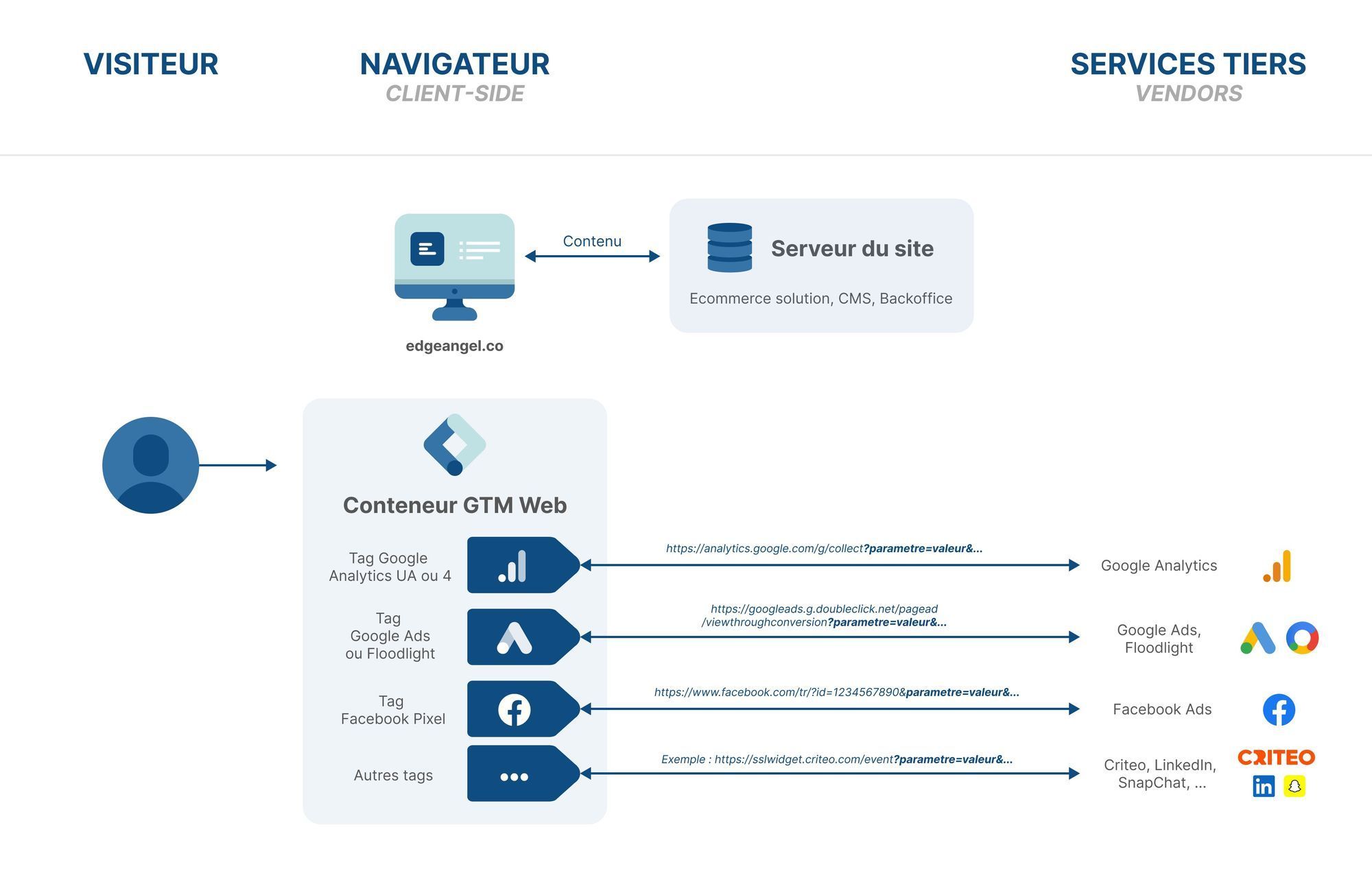
Historically, almost all data flows transited directly from the browser to third-party platforms (Google Analytics, Google Ads, Meta, TikTok, etc.). Each user action triggered a cascade of network calls, multiplying scripts, weighing down the frontend, and exposing data:
- strong dependency on browsers
- vulnerability to adblockers and ITP restrictions
- poor control over governance and signal quality
This architecture is structurally limited today when aiming to seriously steer media performance and compliance.
GTM Server-side Architecture
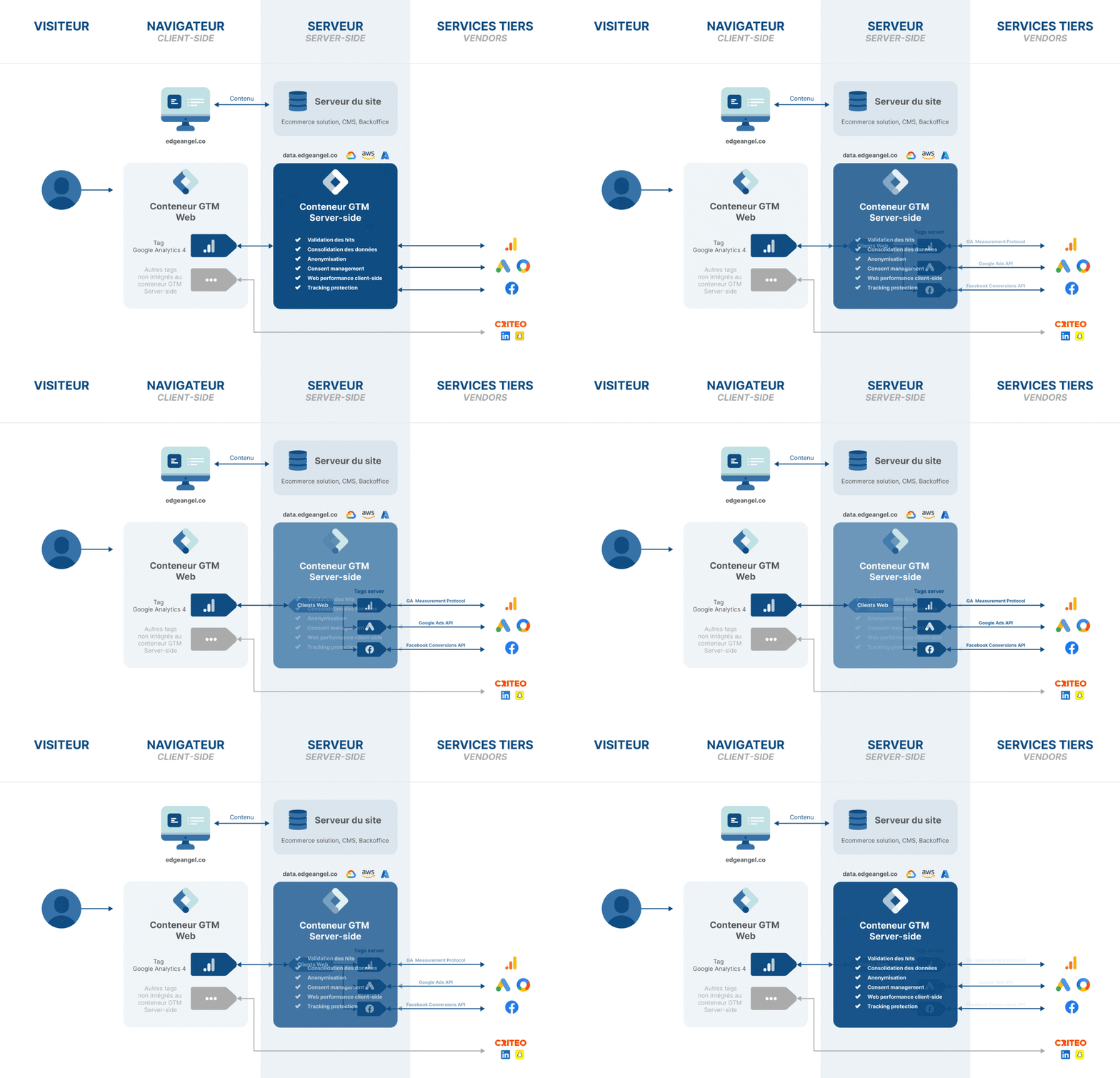
With server-side tagging, you introduce a controlled intermediate server between the browser and platforms:
- the browser sends only a reduced number of requests to your first-party domain
- the server receives, cleans, enriches, and normalizes the data
- flows are then redirected to partners via API (Google Ads API, Meta CAPI, GA Measurement Protocol…)
We are no longer talking just about tracking, but about a true data hub at the heart of your marketing stack.
⚠️ Warning: "Submarine" tracking and Governance responsibility
Server-side does not exempt you from GDPR — quite the contrary. It imposes impeccable governance: strict respect for consent signals, flow traceability, processing documentation. Technical control power implies a reinforced duty of compliance.
Why it has become a standard (and no longer an option)
1. Web performance and total control
Reducing client-side JavaScript load directly improves Core Web Vitals and frontend stability. But the stake goes beyond performance: with sGTM, no data leaves without server validation. You regain control over what is transmitted, to whom, and under what conditions.
2. Resilience and 1st Party context
Configuring a dedicated subdomain (e.g., metrics.mysite.com) allows anchoring collection in a first-party context:
- better deliverability
- lower exposure to blocking
- measurement continuity in an increasingly constrained web
3. Cookies and ITP (Intelligent Tracking Prevention)
Safari and Firefox drastically reduce the lifespan of JavaScript cookies. Server-side allows restoring persistence consistency via HttpOnly cookies set server-side, compatible with a privacy-by-design approach, while maintaining analysis capability over time.
Beyond tracking: New Use Cases (Modern Data Stack)
sGTM is no longer just an analytics brick. It is an advanced activation lever in your data ecosystem.
Data Enrichment
The server becomes a strategic junction point to inject business value:
- adding product margin to steer campaigns on POAS
- integrating LTV, churn, CRM scoring indicators
- advanced server-side audience segmentation
All this without ever exposing sensitive data in the browser.
Streamlined BigQuery Pipeline
Thanks to native connectors and server exports, sGTM becomes a clean collector to feed your marketing data warehouse:
- better log quality
- reduction of frontend-related biases
- solid foundation for advanced attribution and incrementality
Infrastructure: Native Cloud vs Managed Solutions
Two main schools coexist today.
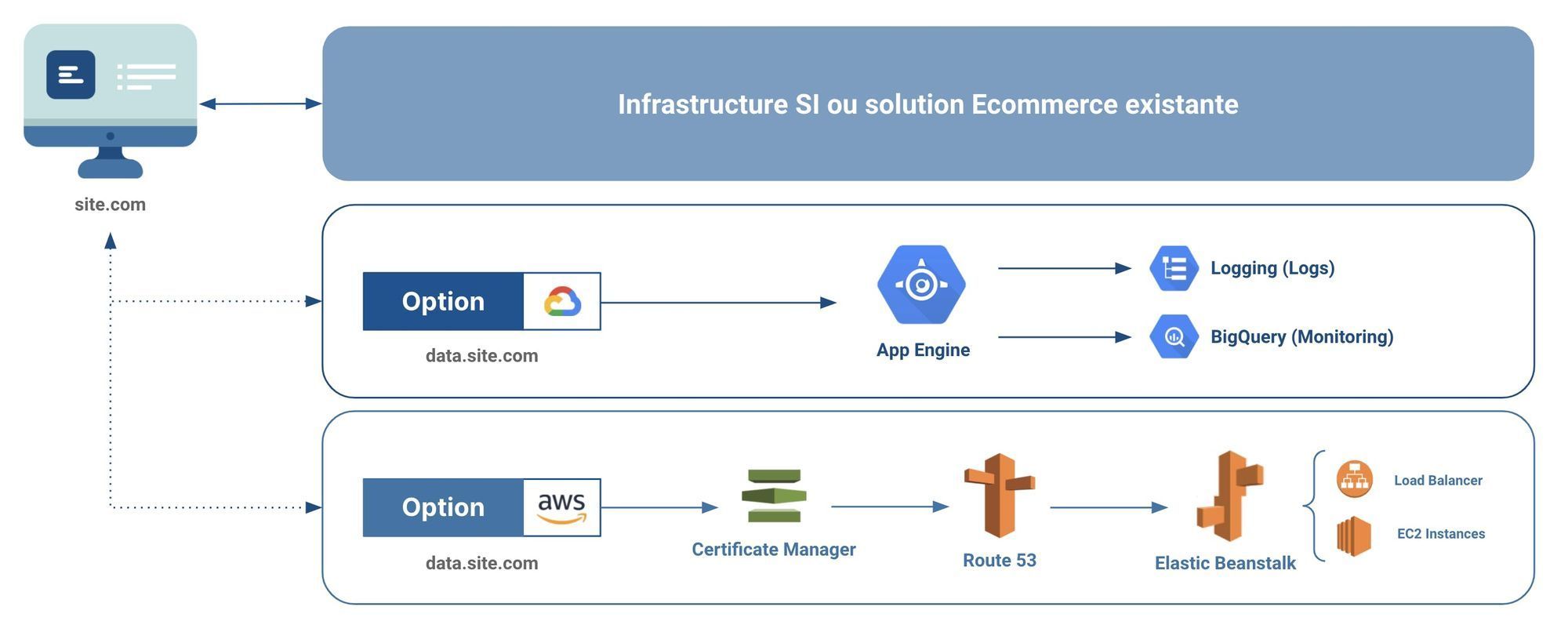
1. The "Native" Approach (GCP / AWS)
You deploy your own infrastructure:
- Pros: total control, maximum flexibility, fine integration into your IT system
- Cons: DevOps dependency, SSL certificate management, cost and scalability monitoring
2. Managed Solutions (Addingwell, Stape, etc.)
These platforms have established themselves as deployment accelerators:
- Cookie restoration to bypass ITP limitations
- Custom loaders to reduce adblocker impact
- Simplified collection monitoring
- rapid activation of technical features
They do not replace solid governance but facilitate sGTM scaling at large.
Case Study: Observed Results
On recent EdgeAngel deployments (2024–2025):
Google Analytics
👍 +15% to +30% data recovery vs classic web tracking
Meta CAPI
👍 +10% to +20% attributed conversions thanks to cookie resilience and flow stabilization
These gains do not come from a "hack", but from a more robust architecture facing modern constraints.
EdgeAngel's Take
Do not view server-side tagging as a technical expense anymore, but as a strategic data asset. It is the infrastructure securing your collection for the next 5 years.
Steering large media budgets without sGTM today amounts to driving blindly. The real risk is no longer "bad tracking", but deciding based on partial data.
🆕 2026 Trends: what will really matter
1. Signal Quality > Data Quantity
Ad platforms increasingly prioritize first-party signal quality rather than raw event volume. Server-side becomes the key point to normalize, enrich, and ensure reliability of these signals before activation.
2. Consent Mode × Server-side Alignment
The future is not "server-side vs privacy", but server-side serving privacy: performing stacks will be those integrating Consent Mode v2 natively into server pipelines.
3. Hybrid "Client Light / Server Strong" Architectures
We see models emerging where:
- the front collects only the essentials
- the server orchestrates data logic
- CRM and CDP become activation pivots
4. Tracking as a Data Ops Subject
In 2026, collection will no longer be a "marketing tool" subject, but a full-fledged data engineering subject: monitoring, data SLAs, flow observability, multi-team governance.
Level Up
Stop leaving a significant part of your conversions "in the wild".
Deploying sGTM is not just securing your compliance, it's taking back control of your performance and anchoring your tracking in a sustainable logic.
👉 EdgeAngel teams already support demanding organizations on these server-side architectures, from design to industrialization.
Need help with this topic?
Discover how we can support you on Web Tracking (sGTM).
More notes like this one?
We publish regularly on LinkedIn what we learn in the field. The algorithm doesn't favor us, so hit the bell to make sure nothing slips through.