Google Analytics: Data Modeling and Attribution

Foreword
GA introduces the concept of modeling. Through collected data (called observed data), the tool is capable of modifying and enriching reports to compensate for data losses related to technological developments. This includes browsers that increasingly protect users (ITP), as well as the regulatory framework, such as GDPR for advertisers who make GA conditional on user consent.
In this note, we review the different functionalities related to modeling and present the results of our initial analyses.
Definitions and Distinctions
Conversion modeling and behavioral modeling are two distinct functionalities.
1. Conversion Modeling
GA integrates modeled conversion data automatically into main reports and exploration reports. Specifically, this functionality allows associating the "right" acquisition source to different events and conversions for which information related to the source (UTM/gclid, etc.) is not directly available.
How does it work?
"Google's models look for trends between conversions that are directly observed or not. For example, if conversions attributed on one browser are similar to unattributed conversions on another browser, the machine learning model predicts the overall attribution. Conversions are then aggregated based on this prediction, combining both modeled conversions and observed conversions."
This functionality improves conversion attribution and particularly counters browser policies that limit the time window for first-party cookies.
This functionality is designed to respect personal data:
"Google does not allow fingerprint identifiers or other attempts to identify individual users. Instead, Google aggregates data (such as historical conversion rates, device type, time of day, geography, etc.) to predict the probability of conversions."
2. Behavioral Modeling
This functionality is linked to the implementation of Google Consent Mode and concerns publishers who have made GA subject to user consent.
Consent Mode allows collecting browsing data on users who have not given their consent. It is a mode that adapts the information sent to Google based on user consent:
- When users give their consent, tags function normally.
- When users have not given positive consent, tags continue to send "pings" without cookies to GA.
Data related to users who have given their consent appears in GA reports, and we call this observed data. Data related to users who have not given their consent allows activating modeled data (behavioral modeling) if prerequisites are met (a certain data volume is required to be eligible). Behavioral modeling (linked to Consent Mode implementation) specifically allows displaying in GA reports the data of users who have not given positive consent. The conversion modeling (functionality 1) will be applied to this observed data and allow for proper attribution.
⚠️ Attention Point
Consent Mode is a solution proposed by Google but is not officially validated
by CNIL. Each actor, with the support of their legal and analytical partners,
must build their own collection strategy based on their risk assessment
(see our expert note dedicated to GDPR and Google Analytics).
Conditions to activate behavioral modeling:
- Correctly implement Consent Mode (send the ping to GA before CMP triggering and without consent).
- The property collects at least 1,000 events per day, with the analytics_storage='denied' parameter set for at least seven days.
- The property has at least 1,000 users per day sending events, with the analytics_storage='granted' parameter set for at least 7 of the previous 28 days.
- Once the data threshold is reached, it may take more than 7 days within this 28-day period before the model is well trained. However, it is possible that even additional data may not allow Analytics to train the model.
3. Reporting Identity
This functionality, configurable in GA administration, allows choosing the method to define the notion of user. It is also through this functionality that you can activate or deactivate behavioral modeling (if it is eligible after Consent Mode implementation).
We can work with three options:
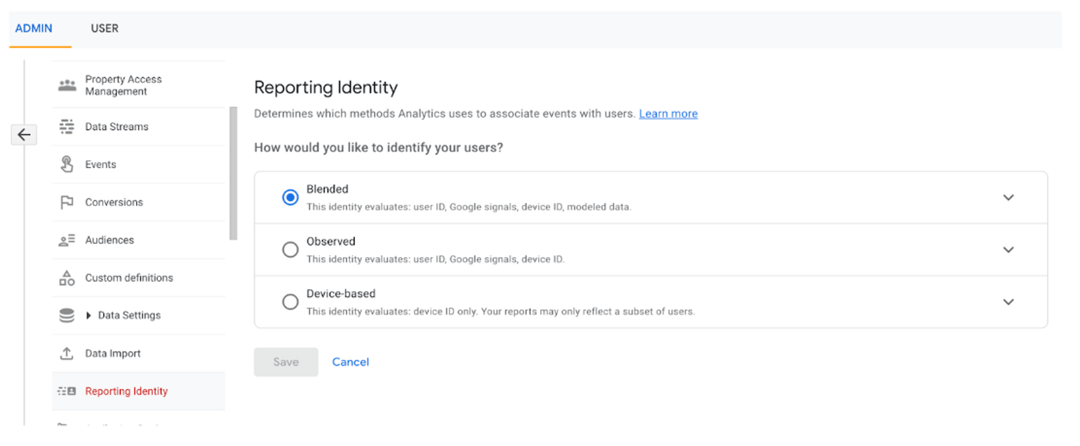
Option 1: Blended
- The user is first defined by using the user_id (a parameter that can be sent to Google when the user logs in, for example). This allows considering the same user connecting via different devices.
- If the user doesn't have a user_id (for example, if there's no login space), Google will use its own signals (if you have activated Google signals) to identify the user. As with user_id, this allows unifying the same user, but this time, it's Google that provides the information (especially if the user is logged into a Gmail account).
- If the user doesn't fall into the first two cases, they are defined by the device ID (for the Web, this will be the Google Analytics cookie "cid" for insiders).
- Finally, if the user has not given consent, Google activates behavioral modeling (if it is eligible after Consent Mode implementation).
Option 2: Observed
The user is defined as for the "Blended" option, but without behavioral modeling.
Option 3: Device-based
The user is only defined by the device ID (for the Web, this will be the Google Analytics cookie "cid" for insiders).
➜ This functionality is crucial to understand as it has a major impact on the data shown in reports. It has subtleties:
- The setting is retroactive, it's a calculation method that doesn't affect the collection mechanism.
- Reporting identity influences standard reports, exploration reports, but also the GA API (if you connect Google Analytics to a BI tool or if you export data via an API using an ETL, for example).
4. GA Attribution
Finally, GA introduces a new functionality that allows choosing the attribution model that will be applied to "conversion" and "revenue" metrics related to "Attribution" dimensions:
To date, there are 7 attribution models:
- Data Driven
- Last Click (cross-channel)
- First Click (cross-channel)
- Linear (cross-channel)
- Position-based (cross-channel)
- Time Decay (cross-channel)
- Ads Preferred Last Click
This new functionality allows moving beyond the Last Click (excluding direct) model that GA UA offered and encourages site publishers to use the data-driven model. This attribution model allows distributing a conversion and revenue to the different channels that were involved in the user's journey. It relies on machine learning and the publisher's data to optimally distribute the conversion. This functionality aims to highlight channels that are involved in the user's journey that were not necessarily identified in the Last Click model of GA UA, and thus allow site publishers to better manage their media buying and marketing efforts.
This functionality, like the previous ones, has an impact on data presentation in the GA interface and the workflow related to data processed by the tool.
Note: Google has announced its intention to deprecate most models to keep only Data Driven and Last Click.
Analysis: Impact of Modeling and Attribution
Here is a study on the impact of these functionalities on conversion volume and the weight of the Google CPC channel:
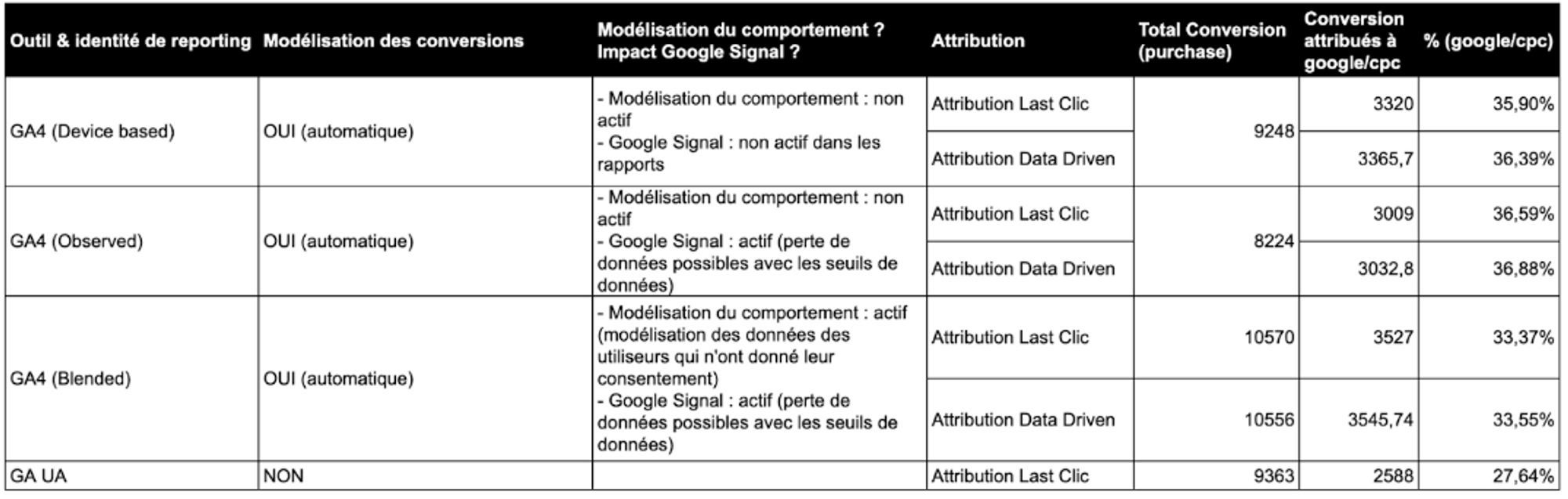
Study conducted on a group of our partner clients - non-sampled data - March 2023 period.
Impact of modeling and GA attribution:
- Impact of conversion modeling (GA vs GA UA): conversion modeling in GA increases Google/CPC to 36% compared to 27% on GA UA, representing a 30% uplift.
- Estimated impact of behavioral modeling (Observed vs Blended): modeling allows recovering nearly 30% in total conversion volume and 17% on the Google/CPC channel.
- Estimated impact of Google signals on data loss (Device-based vs Observed): we lose 11% of conversions.
- Estimated impact of the Data-Driven Attribution model: for these clients, data-driven attribution varies the weight of Google/CPC marginally (+ or - 1%).
Conclusion
This study confirms that the new GA functionalities modify how data is understood and they address on paper the technical (browsers) and regulatory (GDPR) challenges.
These functionalities are relatively technical and subtle and the underlying model also remains rather opaque (comparable to a "black box"). This can be a barrier for publishers who don't have a sufficient level of maturity or who have distrust towards Google.
To benefit from these functionalities, you will need to use the data processed by GA and not the BigQuery export (raw data) and in this case, we recommend using the following workflow to take advantage of these functionalities:
- Ingestion and storage: Export GA data to your data warehouse (for example BigQuery) from the GA API using an ETL like Airbyte.
- Transformation: enrich and structure data with other sources (e.g.: media data).
- Activation: Connect a data visualization tool (e.g.: Google Data Studio).
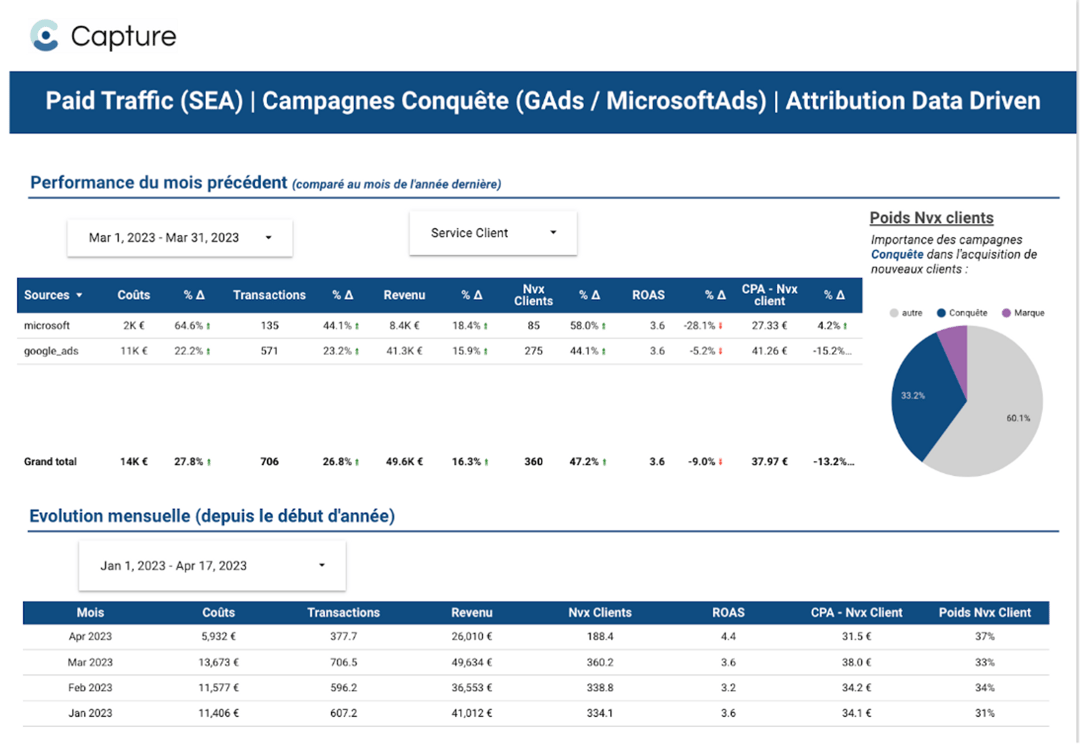
Example of dashboard implemented thanks to our Capture solution (which relies on this workflow):
More notes like this one?
We publish regularly on LinkedIn what we learn in the field. The algorithm doesn't favor us, so hit the bell to make sure nothing slips through.